Guide menu
A guide based on PC Stable 42.21, checking why you cannot move, fight, find enough food or water, or craft. Find the relevant early controls, basic survival and processing checks.
▶ Start a guide
What is Project Zomboid?
A guide based on PC Stable 42.21, checking why you cannot move, fight, find enough food or water, or craft. Find the relevant early controls, basic survival and processing checks.
Edition: PC Steam base game (app 108600), a new solo game without mods. Based on Stable 42.21 and standard Apocalypse rules. Rising is identified separately as a beginner practice example; differences in town, traits, Sandbox and MP settings are kept distinct.
Verification scope: The official “Stable Build: 42.21” label and the September 28 stable-release announcement were checked on 2026-10-04. This is separate from Build 41 (legacy41) and the earlier Build 42 Unstable branch. Basic processing quantities were compared with public B42 game data and 42.20.4 material, and the 42.21 change announcement was checked. Not every recipe has been verified in a running 42.21 game.
Sources checked: 2026-10-04
21 / 21 rows
First match 42.21, the mode and the settings
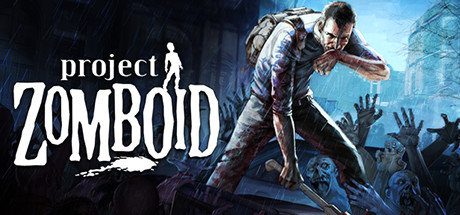
Project Zomboid is a zombie survival game in which you gather supplies while managing food, rest, injuries and your base. Before counting enemies killed, check whether you can finish the errand and return. These 4 articles cover establishing everyday survival in a new solo game.
Wide tables scroll horizontally.
| What to check | This article’s baseline | How to read it if yours differs |
|---|---|---|
| Release branch | 42.21 Stable officially checked on 2026-10-04 | Compare the selected Steam branch with the title-screen version; the same version number on Unstable is not enough. |
| New world | Standard Apocalypse without mods | Enemy and survival conditions differ from the Rising practice example. Do not transfer values between them. |
| Older worlds | Does not cover continuing from B41 or 42.19 | B41 saves are incompatible with B42. Use legacy41 to continue B41; check the appropriate branch for an older 42.19 world. |
| Player count | Solo, with pausing available | In MP, prioritize the server’s settings, progression and version. |
| Starting conditions | No fixed town, occupation or traits | Enemies, loot and character condition can vary even in the same building. No fixed coordinates are guaranteed safe. |
| Scope | First outings, a place to rest, water, food and representative processing tasks | Does not cover every recipe, every map, story secrets or an optimal route to permanent survival. |
No matching entries in this table. Shorten the query or clear it to restore all entries.
This guide compares published material. It does not report measurements of every action and recipe in a running 42.21 game. B42 material used for ingredient quantities also differs in its stated minor version, so prioritize the requirements shown in your game when they differ.
Choose your first check from the problem
Wide tables scroll horizontally.
| Problem | Current state | First check | Article to read |
|---|---|---|---|
| Movement is slow | It became slow immediately after picking up supplies | Check carried weight, Heavy load and leg injuries separately. | Early game: inventory and movement |
| Attacks do not happen | The weapon is in a bag | Check the hand equipment slots and aiming stance. | Early game: starting combat |
| Fighting only a few zombies leaves you struggling | You are out of breath and in pain | Distinguish endurance, drowsiness and muscle strain in Health. | Early game: disengaging from combat |
| Entering houses is always dangerous | You cannot see beyond the window or door | Check the surroundings, visible interior, another exit and broken glass. | Early game: entering buildings |
| You have water but still have a problem | You are unsure about the container or water quality | Check the contents, amount remaining and contamination label. | Survival: separate drinking water |
| Food spoils even in the refrigerator | The power has failed | Check freshness and whether the food is being cooled. | Survival: storage and power loss |
| Bleeding will not stop | You have bandages or a first aid kit | Right-click the actual injured body part in Health. | Survival: wounds and condition |
| Furniture is missing from the crafting list | You are searching after pressing B | Distinguish the crafting and building interfaces. | Processing: use the correct interface |
| You have materials but cannot craft | A recipe requirement is unmet | Check material type, location, tools, skills, knowledge and facilities in order. | Processing: diagnose crafting problems |
No matching entries in this table. Shorten the query or clear it to restore all entries.
When unsure, check condition → supplies → surroundings → task
If you organize inventory, fight and build all at once, it becomes harder to identify what caused a failure. First establish the conditions needed to finish one task.
- In solo, pause with F2 and read the moodle descriptions and Health with H. In MP, do not open panels expecting the world to pause.
- Equip the weapon in your hands and move water and first aid supplies where you can use them quickly. Put down unnecessary items to reduce carried weight.
- Check visible approaches, your rear and the route back. If you are being pursued, stop gathering or crafting and leave.
- Choose one objective. For filling water, prepare a container and source; for a crate, prepare the materials and building interface.
- After the task, recheck remaining supplies, finished items, equipment and your condition. Start another outing only while you have enough reserve to return.
This is one example of an order for organizing decisions. If you are bleeding or an enemy is approaching, prioritize retreat and stopping the bleeding over planned crafting.
What to keep separate when older guides differ
Wide tables scroll horizontally.
| Comparison point | What to check in Build 42 | Misinterpretation to avoid |
|---|---|---|
| Mode selection | Apocalypse・Outbreak・Rising・Extinction | Do not treat descriptions of the old Survivor/Builder modes as the new modes’ defaults. |
| Crafting and building | Materials and input/output searches in the separate crafting and building interfaces | Do not assume right-clicking reveals every recipe. |
| Physical condition | Breathlessness, drowsiness, muscle strain and clothing discomfort | Do not assume sitting once has restored everything. |
| Water | Water quality inside the container and its current capacity display | Do not directly convert B41 units into liters. |
| Map | Reworked buildings and current enemy placement | Do not guarantee an empty room, an escape route or loot from an old guide map alone. |
| Co-op | Server version, settings and completed item transfers | Do not apply solo pausing or sleep conditions unchanged. |
No matching entries in this table. Shorten the query or clear it to restore all entries.
Distinguish character death from losing the world
Ordinary death takes away that character and the skills they developed, but it does not automatically erase every building in the same world. You can continue that world with another character.
- Select the world you want to continue and start with another character. Distinguish this from creating a new world.
- Before attempting recovery, prepare water, a weapon and first aid supplies for the new character. Do not assume the previous belongings are still safe to recover.
- Use the town and landmarks to head toward the former base. Turn back if enemies or hazards remain, and make recovery a later objective.
Deleting a world, starting a different save, a server wipe and moving to an incompatible branch are separate issues. Avoid assuming that dying always erases your base.
Project Zomboid FAQ

Steam ¥5,000

eSwap X2 Pro

Steam Deck OLED

Corsair HS65 Wireless
Affiliate links to Amazon Japan. Purchases may earn us a commission at no extra cost to you. Check the retailer for current prices.
HORI mini controller for Switch
eShop ¥5000 — Rakuten
History of Indie Games
Rakuten Points ¥3000
Affiliate links to Rakuten Japan. Listed prices are indicative; check the retailer for current prices.

Steam Deck OLED
See product details and current availability on Amazon Japan.

Amazon gift card ¥3,000

G PRO X SUPERLIGHT 2
Affiliate links to Amazon Japan. We may earn a commission on purchases. Listed prices are indicative and may change.
This week in the community
Guide videos
Opens YouTube, an external website.
Related games
- → Kenshi (Japanese) Squad survival through managing harsh setbacks
- → Abiotic Factor (Japanese) Co-op survival and crafting
- → Stoneshard (Japanese) An RPG about managing injuries and condition

G435 LIGHTSPEED
See product details and current availability on Amazon Japan.

ASUS ROG Swift 27"QHD
Steam Deck OLED

Steam ¥5,000

MX Master 3S
Affiliate links to Amazon Japan. We may earn a commission on purchases. Listed prices are indicative and may change.