INDIE GAME / GUIDE INDEX
The Pedestrian Guide: 7 Areas, Vehicle Codes, Saved States, and Hats
Released: Guide to the standard Steam version · Updated 2026-10-13
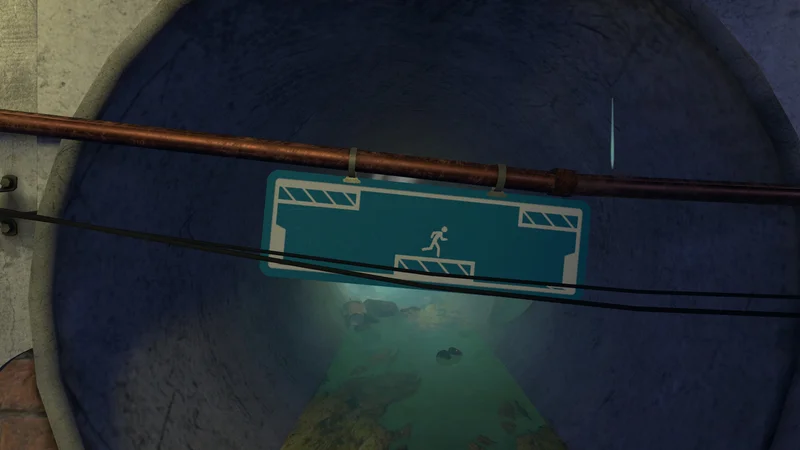
Switch between connecting signs and moving the person. Distinguish lasers, power, and green preserved states to order your actions without losing retrieved items.
Choose a guide by objective
Warehouse and subway
Where items cannot cross an arrow boundary, use local box or laser-blocking mechanisms instead of a generic suggestion to throw them.
Read the guide →Sewers and streets
Overlap a cutout door with blank space on another sign to create a drop opening. You can also detour back to the sewer hat before bringing the key home.
Read the guide →University
Bring a light, box, and cable back to the university hub. Separate temporary item placement from disabling lasers to collect them.
Read the guide →Alley and external power
Some hydraulic pistons opened by external power remain open even when signs are rearranged. Carry that state into the next layout.
Read the guide →Rooftops and green preserved states
Contents of green signs survive connection changes. However, connected devices reset differently depending on whether the powering lever is inside or outside the green sign.
Read the guide →Apartment and ending
The finale moves between signs and actual rooftops. A box placed inside a sign appears in reality, while an object moved in reality is reflected in the sign.
Read the guide →5 hat entrances and checks
Faint ladders in the subway, sewers, university, alley, and rooftops lead to all 5 hat rooms. Check the pairs of hat types in acquisition order separately from room numbers.
Read the guide →10 achievement conditions
Steam's 10 requirements are separate from hats. Skipping the rooftop left-box branch with a shortcut can leave an achievement locked, so follow the normal route.
Read the guide →Game information
- Developer / publisher
- Skookum Arts / Skookum Arts
- Release / Early Access start
- 2020-01-29
- Platforms
- PC / macOS / Linux / Nintendo Switch / PS4 / PS5 / Xbox One / Xbox Series X|S
- Genres
- Puzzle / Adventure / Indie
Progression through 7 areas
Distinguish sign doors, ladders, cutout holes, and power outside signs. Instead of reproducing layout diagrams, original tables organize items to fetch and state changes.
| Goal / scene | Action | State check |
|---|---|---|
| Warehouse | Learn keys, ladders, and buttons | Bring the first battery to the shared console. |
| Subway | Collect a box, cable, and chip | Train 199. |
| Sewers and streets | Overlapping doors, key, box, cable, and coil | Train 748. |
| University | Light, box, and cable | Train 274. |
| Alley | External power and persistent pistons | Train 772. |
| Rooftops | Green preserved states, fan, and cable | Lift 399, then 444 at the end. |
| Apartment | Move between signs and the real rooftop | Final closet key → boat. |
Control differences to understand first
Distinguish sign doors, ladders, cutout holes, and power outside signs. Instead of reproducing layout diagrams, original tables organize items to fetch and state changes.
| Goal / scene | Action | State check |
|---|---|---|
| Door lines | Connect points facing each other | A dotted line cannot be used as a passage. The official explanation specifies within 160 degrees. |
| Lever | Sustained power | Different from a button's one-time signal. |
| Object interaction | PC default E | Follow on-screen prompts on other platforms or after rebinding. |
| Cutout door | Overlap with blank space on another sign | Once hatching disappears, use it as a drop-through passage. |
| Green sign | Preserves internal states even when connections change | Also check which side supplies power. |
Area entrances
See Warehouse/Subway, Sewers/Streets, University, Alley, Rooftops, Apartment, and Hats and checks.
Music, artbook, and 2025 chapter selection
Separate Steam products are The Pedestrian Soundtrack, music released February 11, 2020, and The Pedestrian Digital Artbook, released June 23, 2022. Neither is a walkthrough expansion adding new sign stages.
The official December 11, 2025 standard-version update adds Chapter Selection in Options, engine changes, and bug fixes. Use chapter selection to return for missed hats or rooftop achievements. The older Original Release is separated under Steam Betas; do not confuse its lack of chapter selection with the current version.
Frequently asked questions (FAQ)

Xbox Series S
See product details and current availability on Amazon Japan.

PSN ¥1,000

Basilisk V3 X HyperSpeed

G PRO X 60

GameSir T4 Pro
Affiliate links to Amazon Japan. We may earn a commission on purchases. Listed prices are indicative and may change.