INTO THE BREACH · PC / ADVANCED EDITION
Basic tactics: pushing and defense
Learn how to count threats to buildings and assign actions to three mechs. Covers a pushing example, enemy attack types, water, chasms, fire, smoke, attack order, spawn blocking, repairs and rewinding.
Scope: PC Advanced Edition (additional content ON; mechanics based on the official 1.2.88 update announcement) / Content checked: October 2, 2026
Five checks to make first each turn
- Open the attack previews and find threatened buildings, mission units and mechs facing lethal damage. Leave attacks on mechs that can simply move away until later.
- Display fire, terrain events and enemy attack order. When using enemies against each other, always read which one acts first.
- Assign targets that only one mech can reach first. Do not spend a melee mech's action before dealing with a target only artillery can reach.
- Assign the remaining threats to pushes, pulls, disabling or kills. Check whether one move or area attack can redirect several attack previews.
- Before ending the turn, check buildings, every mech's HP, push destinations and upcoming spawns again. Consider Reset Turn if the result differs from the preview.
Pushing example: a ground enemy into water
This example is arranged to explain the rules. It is not a map copied from an actual fixed mission or terrain layout.
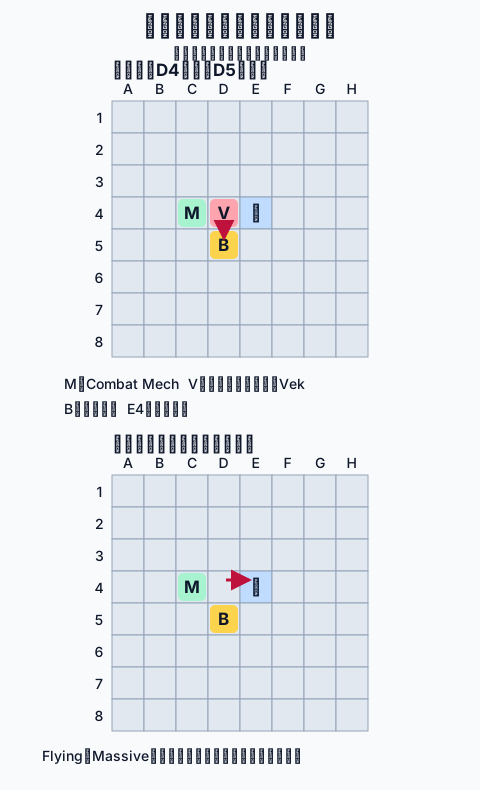
- Place Combat Mech at C4. Check that the enemy at D4 is targeting the building below it at D5.
- Using Titan Fist to the right damages the enemy and pushes it to E4. If it is a ground enemy without Massive, the water kills it.
- A flying enemy survives above the water. An enemy with Massive also does not die simply from being dropped into water, so check its attack preview again.
- The enemy may die from direct damage first. The important question is which attacks remain after the push and in which direction.
Distinguish movement from collision
| Method | When it helps | Exceptions to check |
|---|---|---|
| Push | Shift an attack's origin or drop an enemy into water or a chasm | If the destination is a building, the building also takes collision damage. |
| Pull | Move an enemy away from an adjacent building | When pulling it into your mech, check the mech's remaining HP too. |
| Collision | Remove HP that the weapon's own damage cannot cover | A normal collision deals 1 damage. Do not confuse this with armor's reduction to weapon damage. |
| Throw or swap | Move an enemy that is difficult to reposition with direct fire | Some targets, such as Burrowers, cannot be moved. |
| Block a line of fire | Place another enemy or a mech in front of a direct shot | The same block does not stop arcing, area or piercing attacks. |
| Reverse attack direction | Change the target without moving the attacker | Reversing alone does not stop an enemy that attacks in both directions or all around it. |
Check attack order when using friendly fire
- Move enemy B, which attacks later, into the line of fire of enemy A, which attacks first.
- Check whether A's damage will kill B. If it does, B's planned attack disappears.
- If B survives, check where its attack will reach from its new position. If it targets another building, you need another action.
- Friendly-fire support, A.C.I.D., armor and Psion effects change damage. Do not assume an attack is lethal from appearances alone.
Regular enemies: choose an answer by attack type
HP and damage vary between regular, Alpha and Leader variants, with difficulty and with support effects. This section groups ways to stop each type; read actual numbers in the on-screen preview.
| Enemy | Attack feature | Defensive response to check |
|---|---|---|
| Firefly | Shoots the first target in a straight line | Move it sideways or block the shot with an enemy. Check both front and rear firing lines for a Leader. |
| Hornet | Flying melee enemy; stronger variants also attack the tile beyond | Pushing it into water alone does not kill it. Move it away from buildings and check the attack area extending along the line. |
| Leaper | Leaps closer and webs its target | Do not leave escape entirely to the webbed mech. Use another mech to move either unit or disable the enemy. |
| Scarab | Arcing attack over obstacles | Placing a mech in its line of fire is not a solution. Move the attacker and check whether its impact tile changes. |
| Scorpion | Approaches and webs its target | Stop the webbing enemy with a push, pull or smoke. A Leader threatens several nearby mechs. |
| Beetle | Charges in a straight line and pushes the target it hits | Use water, chasms or another enemy in its path. Do not expect a Leader to drown like the regular variant. |
| Blobber | Places an explosive Blob on another tile | Do not assume killing the main enemy removes a Blob already placed. You also need to protect the area around the Blob. |
| Burrower | Wide melee attack around it; normal forced movement does not work | Dealing actual damage makes it burrow and clears its attack preview. A zero-damage push alone cannot stop it. |
| Centipede | Applies A.C.I.D. around a direct shot's impact | Check nearby allies as well as the impact tile. You can also weaken a moved enemy for friendly fire. |
| Crab | Arcing attack targeting several tiles | After moving it off one building tile, check that a neighboring impact tile does not overlap another building. |
| Digger | Creates rocks around itself and attacks its surroundings | Check whether artillery can reach the main enemy or whether you can push rocks into it. Do not spend all your actions only breaking rocks. |
| Spider | Lays eggs that produce Spiderlings | Check positions webbed by the eggs separately from threats after hatching. Destroying or freezing eggs prevents hatching. |
| Psion | Changes other enemies' HP, armor, healing, explosions on death and more | Read which support effect applies. Combine enemy attack order with changes in HP or death explosions when calculating kills. |
| Pinnacle's enemy robots | Includes direct-fire, piercing and artillery units | If the mission forbids killing them, choose pushes, freezing or other options. Prioritize the attack preview over the unit's name. |
| Goo (boss) | Splits into smaller units when killed | Save actions for the next units and retain the mission objectives. Do not assume smaller units die from water alone. |
- This is not a fixed enemy ranking. Set your response order from buildings currently under attack, mechs that can reach them and the turns remaining.
Seven new AE enemies: additional attack types
| Enemy | Added threat | Position or action to check |
|---|---|---|
| Bouncer | After a melee attack, moves itself backward | Check the recoil destination as well as the target tile. Changing water, chasms or collision targets can turn recoil into a defensive tool. |
| Gastropod | Pulls its target, or pulls itself toward an immovable target | Move allies where they cannot be pulled into chasms. Also check the preview for the enemy's own movement when it aims at buildings or mountains. |
| Mosquito | Flies and places smoke on the targeted tile | Against a regular variant, moving out of smoke may let you act. Do not treat a Leader's webbing and lethal attack in the same way. |
| Moth | Flying artillery with pushes affecting both attacker and target | Check impact damage, collisions involving the target and the enemy's recoil destination together. Simply dropping it into water does not kill it. |
| Plasmodia | Creates a short-lived Spore that fires directly | Treat the main enemy and its Spore as separate threats. Turn the Spore's firing line toward an enemy or stop it before it shoots. |
| Starfish | Attacks several tiles diagonally | Do not assume the same push that redirects an orthogonal melee attack will work. Check for buildings on its new diagonals after moving it. |
| Tumblebug | Creates explosive rocks; rocks left behind also obstruct movement | Read the area affected when a rock explodes. Consider moving it somewhere safe or freezing it while keeping a train's route clear. |
- Do not choose islands on the assumption that these seven types will appear in a run with additional AE enemies OFF. Leader HP and a complete list of exact damage values are still being cross-checked.
Terrain and status uses and exceptions
| Terrain or status | Defensive use | Easy-to-miss point |
|---|---|---|
| Water | Kill ground enemies that cannot survive water | Flying and Massive enemies survive. Even mechs that can enter water may be unable to use their normal attacks there. |
| Chasm | Drop targets that cannot fly | Flying units survive above chasms. You may also remove your own escape route. |
| Smoke | Stop normal attacks | Normal allied units cannot attack in smoke either. Check for smoke immunity. |
| Fire | Wear targets down with ongoing damage | Setting a target on fire does not by itself stop its current attack. Some traits also grant fire immunity. |
| A.C.I.D. | Increase weapon damage and counter armor | It is dangerous when applied to your own mech too. Do not calculate all fire or collision damage as doubled as well. |
| Frozen | Stop the target from acting | Damage thaws it. An unnecessary attack on a disabled enemy can restore its attack preview. |
| Shield | Prevent one instance of damage or prevent Ice from freezing itself | It does not block every hit in a multi-hit attack. |
| Cracked terrain [AE] | Turn it into a chasm with another hit | Results for flying and ground units differ before and after the chasm forms. |
| Boost[AE] | +1 damage on the next attack | Stacking does not increase it without limit. Check both previews for equipment that includes self-damage. |
Deciding when to block a spawn
- Place a mech, enemy, rock or other object on an upcoming spawn tile. The blocking unit or object normally takes 1 damage.
- Blocking does not count as killing the spawning enemy. Check the same spawn point again next turn.
- When blocking with an enemy, check that enemy's own attack preview. A successful block is insufficient defense if the enemy still attacks a building.
- Blocking early can result in several spawns coinciding next turn. Consider remaining turns, movement range and HP.
Repair, Undo Move and Reset Turn
| Action | What it does | When to use it |
|---|---|---|
| Normal Repair | Spend an action to restore 1 HP and clear statuses | Use when you can redirect an attack without attacking, or to deal with fire, A.C.I.D. or freezing. |
| Undo Move | Undo a move before the unit has acted | Recheck range and push destinations from the proposed position. This differs from rewinding everything after an attack. |
| Reset Turn | Normally replay the current turn once per battle | Rework your plan after getting the action order wrong or hitting a building. |
| Special abilities | Isaac adds a Reset, Harold pushes when repairing, and Kazaaakpleth replaces Repair with an attack | Read the pilot ability instead of expecting normal healing from the action's name alone. |
- Reset does not rewind the entire game or return to past missions. Also use attack previews and Test Mech.
Protect grid power and mech HP separately
- Damage to buildings reduces the Power Grid. Avoid the loss caused by running out of grid power above all else.
- Grid Defense is the chance that a building resists damage. A solution relying on chance leaves more room for failure than reliably redirecting the attack.
- Mechs normally recover HP between battles. However, destruction can cost you the pilot, so check whether incoming damage is lethal.
- Grid power does not recover automatically between battles, but power rewards, island shops and reward choices can restore it. Replenish a low grid before going to the next island.
Prepare for the first turn through deployment
- Check enemy movement and weapons, and consider positions without a building behind the mech. A position intended to bait an attack is an option, not a guarantee that the enemy will target it.
- Leave melee mechs space to move beside enemies and artillery mechs space to move sideways. Do not place the entire squad in the same narrow area.
- If enemies use Webbing, space your mechs so that several are less likely to be webbed at once on the first turn. Once previews appear, include escaping webs among your three actions.