Guide menu
For mechanics that commonly cause trouble in Chapters 1–4, this guide explains your current location, the input to check, and the next platform in that order. You can work on collectibles after identifying the main exit.
▶ Start a guide
What is Celeste?
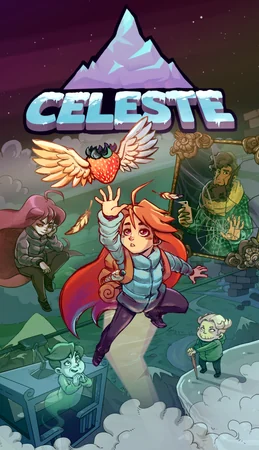
A challenging 2D platformer about Madeline, a girl trying to climb Celeste Mountain. The controls are extremely simple: jump, air-dash, and grab walls. Yet a succession of precise stages pushes those three actions to their limits. Instant restarts at the beginning of the room keep the pace brisk. What also makes the game special is its built-in Assist Mode, with individual adjustments including game speed and invincibility. It embodies the idea that the experience of climbing the mountain belongs to everyone. Its story is highly acclaimed too. The source article recorded over 145,000 Steam reviews and an Overwhelmingly Positive rating. Japanese is supported.
145,646 reviews (as of August 2026)
Includes Assist Mode
Action
Maddy Makes Games
「Every mountain can be climbed. Assist Mode is an official way up too」 — Based on the official Steam store description and review record
Scope: PC version; refers to the official v1.4.1.0 changelog. Covers progression through Chapters 1–4 A-Sides with standard dash and stamina settings. / Additional check: October 3, 2026
Chapters 1–4: Goals and mechanics to check
| Chapter | Mechanics used to progress | What to check first |
|---|---|---|
| Chapter 1: Forsaken City | Moving platforms and green dash-refill crystals | Find where the platform is going and where you can refill the next dash before moving. |
| Chapter 2: Old Site | The mirror event and dream blocks | After the mirror scene, dash into the blocks with starry patterns. |
| Chapter 3: Celestial Resort | Cleanup branches and moving black hazards | Talk to Oshiro in the center of Huge Mess and find the switches in the opened branches. |
| Chapter 4: Golden Ridge | Wind, bubbles, clouds, and steerable moving blocks | Check the wind direction, the bubble's launch direction, and where to stand to control moving blocks. |
Chapter 1: Refill your dash and reach the next platform
- Before dashing, find a landing platform or green crystal. Touching the crystal refills a spent dash.
- On moving platforms, jump after they begin moving to use their momentum. First try reaching the exit; collect extra strawberries later.
- If you see a cracked wall, dash into it to check whether a hidden passage opens. Before entering, identify a platform you can use to return.
| What you see | Input to check | What to change after a failure |
|---|---|---|
| Green crystal | Refill a spent dash to make another dash in midair. | Change where you use the first dash so your route touches the crystal. |
| Winged strawberry | It flees when you dash, so approach using jumps and wall grabs. | Check whether you are pressing dash in the section where you are trying to collect it. |
| Screen boundary | Changing screens refills your dash. Some collectibles require moving across a boundary. | Try the dash after entering the next screen and the direction of your return separately. |
Chapter 2: Use dream blocks after the mirror
- Approach the underground mirror and advance the reflection scene. Dream blocks that were impassable before the event become usable afterward.
- Dash into the blocks with starry patterns. Check the exit side for spikes before choosing the direction to travel through.
- During Badeline's chase, plan a route using the platforms ahead and the next blocks. If returning for a collectible, check the pursuer's position too.
| Where you are stuck | What to check next |
|---|---|
| You cannot enter the star-patterned block | Check whether the underground mirror event is complete. Afterward, dash into the block rather than walking. |
| You fall immediately after leaving the block | Exit toward a wall you can grab, or change the angle to connect with the next block. |
| You cannot collect a strawberry during the chase | Complete the route toward the exit first. Try optional collection after finding a return route that avoids the pursuer. |
Chapter 3: Check how cleanup changes the branches
- Talk to Oshiro in the center of Huge Mess to open the cleanup branches.
- Follow the branches with books, towels, and boxes, and press the switches at their ends. Clearing one type removes its obstacles and changes routes through other rooms too.
- Return to the center and complete the remaining branches. Switch order also affects collectible routes. If platforms differ from a video using another order, judge by what remains in your game.
- In rooms with moving black hazards, observe a full movement cycle before jumping in. Prioritize cleanup and the chapter exit; check strawberry detours as separate routes.
| Situation | Progress check |
|---|---|
| No new routes open from the center | Check your conversation with Oshiro and any unfinished branches. |
| The books, towels, and boxes differ from a guide image | Check which cleanup switches you already pressed. Cleanup order changes which obstacles remain. |
| You cannot return to a collectible | Look for gaps newly opened by cleanup and the path back to the center. |
Chapter 4: Use bubbles, clouds, and moving blocks
- Check how far one mechanic can carry you before connecting to the next bubble, cloud, or platform.
- If a moving block catches in a passage, try changing where you stand or which face you touch to reach its control buttons.
- Where wind and clouds overlap, check separately whether a jump alone reaches the destination and whether you need to save your dash.
| Mechanic | Input | Where to look next |
|---|---|---|
| Green bubble | Enter the bubble, then input the direction you want to travel. After launching, connect a dash toward the next platform. | Check walls and bubbles above and diagonally beyond the launch, as well as straight ahead. |
| Cloud | Time your jump with the cloud's upward bounce. | Test whether you can reach the high platform. If not, change your jump timing. |
| Moving block | Activate it by riding or grabbing it. On faces with control buttons, use directional inputs to steer. | If spikes or walls lie ahead, check where the usable buttons are before boarding. |
| Wind | Check its direction before deciding how to launch from a bubble or where to grab a wall. | In headwind sections, find the next wall you can grab before going airborne. |
- This progression guide covers the mechanics in Chapters 1–4 A-Sides. Progression from Chapter 5 onward and complete collectible locations are outside its scope.
Celeste FAQ

HyperX Cloud III

iiyama 27" FHD

Razer Viper V3 Pro

G PRO X 60
Affiliate links to Amazon Japan. Purchases may earn us a commission at no extra cost to you. Check the retailer for current prices.
PowerA Fusion Pro
Rakuten Points ¥3000
Roguelike Design Theory
Balatro strategy guide
Affiliate links to Rakuten Japan. Listed prices are indicative; check the retailer for current prices.

G305 LIGHTSPEED
See product details and current availability on Amazon Japan.


Affiliate links to Amazon Japan. We may earn a commission on purchases. Listed prices are indicative and may change.
This week in the community
Guide videos
Opens YouTube, an external website.
Related games
- → Hollow Knight: Silksong (Japanese) Challenging 2D action
- → Pizza Tower (Japanese) Fast-paced 2D action
- → ANIMAL WELL Exploration built on discovery

DualSense Edge
See product details and current availability on Amazon Japan.

G435 LIGHTSPEED

Alienware ultrawide

Steam Deck OLED

Steam ¥3,000
Affiliate links to Amazon Japan. We may earn a commission on purchases. Listed prices are indicative and may change.