FTL: Faster Than Light(PC (Steam) / Mac / Linux)
Controls and the Route Through 8 Sectors
Learn what to check while paused, how to time laser volleys, how to handle fires, boarders, and suffocation, and how to plan travel and purchases.
Scope: PC Steam base game and Advanced Edition (AE enabled and disabled are distinguished). Content checked October 2, 2026.
5 Things to Check While Paused
- Compare enemy missiles, lasers, and beams against your defenses. Regular shields cannot block missiles.
- Check enemy Weapons, Shields, Piloting, and healing, then choose the first room to disable.
- Count your projectiles. Coordinate a volley that removes the shields instead of autofiring weapons separately.
- Check crew HP, fires, breaches, oxygen, and boarders. Avoid routing your crew through vacuum.
- Prepare an FTL jump if you cannot win. Think about Piloting and Engine repairs and suppressing enemy attacks at the same time.
Example: 3 Laser Shots Against 2 Shield Layers
This example uses regular shields and assumes all shots hit and no layer recharges between hits.
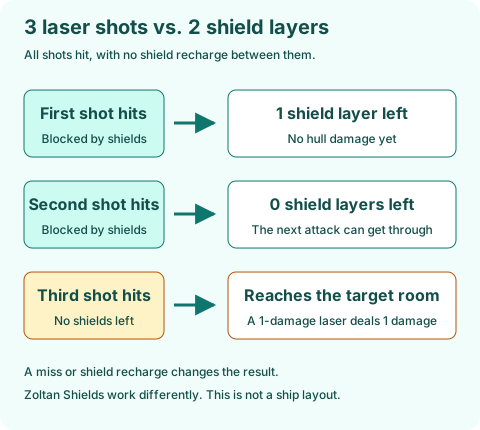
- A normal laser removes 1 regular shield layer per hit regardless of its damage.
- If 3 shots hit 2 layers in sequence, the first 2 are blocked and the remaining 1 reaches the target room.
- To get a beam through as well, fire while the shields are down. Autofire may not synchronize it with other weapons.
- Enemy evasion can spoil the plan. Watch the shield indicator after the hits before firing again.
Recover From Fires, Boarders, and Low Oxygen
| Situation | What to Do While Paused | Mistake to Avoid |
|---|---|---|
| Fire | Vent the room to space and move crew to an oxygenated room. Rock crew can also put out fires. | Do not leave crew taking damage from both fire and vacuum. |
| Boarders | Use doors to hold them back and funnel them toward the Medbay or another defended position. | Do not abandon Piloting or Weapons to chase boarders at the expense of your ship's defenses. |
| Hull Breaches | Send a repair crew member, but first check the route and room have enough oxygen. | Do not simply add power to Oxygen while leaving breaches and doors to space open. |
| Low Oxygen | Close exterior doors, repair breaches, and power Oxygen. | Do not leave non-Lanius crew in a room with a Lanius for too long. |
| Your Crew Are Aboard the Enemy Ship | Check the Teleporter cooldown and enemy hull HP. | Do not finish off the enemy ship before returning your crew. |
Choose Sectors and Exits
- In each new sector, check the exit and the beacon connections. Preserve a path to the exit as the Rebel fleet closes in.
- Check your fuel and stop at stores or events that can provide more. Do not explore a dead end you cannot afford to leave.
- At a store, cover repair and fuel needs, then buy the firepower, defense, or optional system your build lacks.
- Unknown distress calls are not always beneficial. Crew species and gear can unlock blue event options.
- If you want to unlock a specific ship, check which Homeworlds or Stronghold the event needs. Do not confuse a Controlled sector with the corresponding Homeworlds.
- In Sector 8, locate the base and the Flagship. You are no longer trying to reach a normal exit like in the first 7 sectors.
- Sector layouts vary by run. There is no fixed map or route that guarantees a store.