INDIE GAME / PC・Steam
CrossCode Beginner Combat Guide: Equipment, Guarding and Safer Healing
Before repeating fights for levels, check equipment across every slot and watch one enemy attack without trying to trade hits. Then decide whether the next adjustment should be damage, defense or a safer action window. This checklist is a way to identify a problem with your current setup.
Sources checked: 2026-10-17
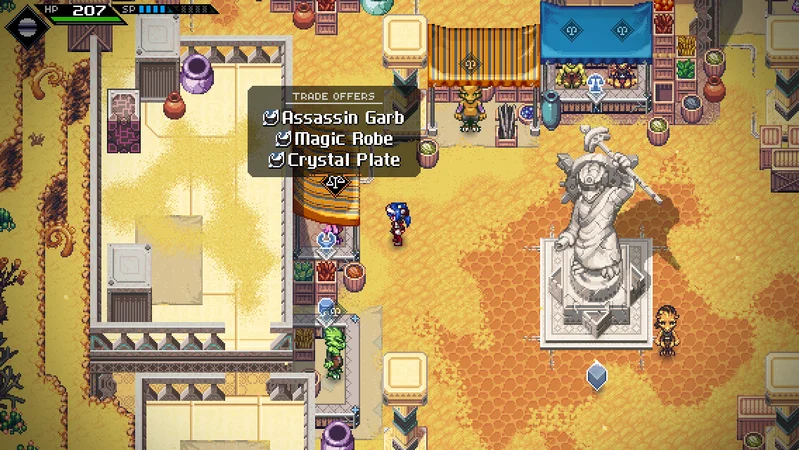
Image: Radical Fish Games
Steam full release, ordinary early-game play; basic mechanics in the 1.4.2 series. Sources checked October 17, 2026. The official hotfix announcement and version history use different suffixes, so the exact latest build is unconfirmed. Not tested in-game; use your current control bindings.
8 sections. Spoiler details are not included in search.
1. Find equipment slots that have fallen behind
Equipment contributes stats and modifiers, so upgrading only a weapon can leave other parts of the setup outdated. Open the equipment screen before another grinding session. Compare all slots with items available in the current area, and identify the oldest pieces rather than treating character level as the only measure of readiness.
If comparing items is difficult, enable equipment-level display. Menu labels and layout may differ. Use the level to spot an outdated slot, then compare stats and modifiers before buying.
Visit ordinary shops as well as traders. An item exchange that needs materials is not the only possible source of an improvement. Compare the shop stock first, then decide whether collecting trade materials solves a remaining gap. This is a purchasing check, not a claim that every shop item beats every traded item.
2. Identify one opening before extending an attack
Enemy attack patterns and openings vary. Pick one enemy type that gives you trouble, keep some distance and watch what happens before and after its attack. Try approaching, backing away and hitting it with a ball separately so you can tell which response works.
Choose a cue to stop attacking, such as the start of an enemy’s wind-up, its approach or the end of its vulnerable period. A response that works against one enemy may not work against another. First learn when to leave, then return for an attack you can finish safely.
3. Use guard with direction and duration in mind
Basic guarding protects the direction you face and can break under sustained attacks. If enemies surround you, reposition so that the attack you mean to guard is in front. Holding guard indefinitely does not remove the need to read the enemy or preserve a way out.
For practice, choose between moving away and a short, deliberate guard instead of trying every defensive input together. Perfect guarding can wait until the basic choice feels clear. This section describes the ordinary guard; special equipment effects can change its behaviour.
4. Practise one Combat Art and its input
Combat Arts use SP and are divided by the action used to trigger them: melee, throw, dash and guard. From the arts you have actually unlocked, choose one to practise and check which action leads into it. A technique listed elsewhere is not necessarily available in your current setup.
Use the chosen art during the opening you identified. If it does not activate, check the selected art, the action used to trigger it and your available SP before changing the whole skill setup. If you are hit while trying it, check the timing of the opening separately.
Create a safe interval before using a consumable
Healing consumables have a use animation that can be interrupted by damage. Check the HP-restoring item in advance, before the fight becomes difficult. Once you need it, create distance or use the gap after an enemy action rather than starting item use while an attack is about to hit you.
If healing keeps failing, first change the position where you start using the item. Repeated interruptions tell you that the action window is unsafe; they do not by themselves establish that you need a different item or more levels.
Choose one adjustment for the next fight
Enemies feel too durable: compare equipment and whether you are attacking during a usable opening. You die during your own offense: shorten the attempt and leave at the cue you chose. Guard fails: review facing and how long you held it. Healing fails: make room before starting the animation.
Change one factor, then try the same difficult encounter again. Buying several items, changing your arts and remapping controls at once makes it harder to tell what helped. Keep what worked and move on to the next problem.
Before moving on
- Identify an outdated equipment slot and compare an available shop or trade replacement.
- Choose one enemy cue that tells you to stop attacking or defend.
- Check one unlocked Combat Art and the safe interval needed to use a healing item.
Repeat the check when the problem changes
Use the checklist again when a new enemy changes the opening or a new area makes an equipment slot look old. It is a process for ordinary early play, not a route through dungeon puzzles or a DLC equipment list.
Questions and answers
Should I grind levels first?
First check old equipment and the opening you are attacking. This guide does not set a mandatory level: the aim is to find out whether your current difficulty comes from stats or the way an action is timed.
Why is my guard failing?
Ordinary guard is directional and can break when you keep taking attacks. Face the relevant threat, review the duration and move if enemies surround you.
Which key should I use for a Combat Art?
Use the binding displayed in your current game. Also check the action context—melee, throw, dash or guard—and the unlocked art and SP. A single fixed keyboard or controller instruction would not fit every setup.
Official Steam product information / Review figures are from Steam, with their capture month shown.

VGN Dragonfly F1 Pro
See product details and current availability on Amazon Japan.

Keychron Q1 V2

G435 LIGHTSPEED

BenQ MOBIUZ 27"

GameSir G7 SE
Affiliate links to Amazon Japan. We may earn a commission on purchases. Listed prices are indicative and may change.

8BitDo Pro 2

Steam Deck OLED

JVC GG-01

G305 LIGHTSPEED
Affiliate links to Amazon Japan. Purchases may earn us a commission at no extra cost to you. Check the retailer for current prices.
ELECOM controller
Game Music Collection
eShop ¥5000 — Rakuten
Balatro strategy guide
Affiliate links to Rakuten Japan. Listed prices are indicative; check the retailer for current prices.